
What Is a Super Agent? Router–Worker Design
A super agent is one always-on agent that routes requests to isolated workers in parallel. Learn the Router–Worker design, its four properties and limits.
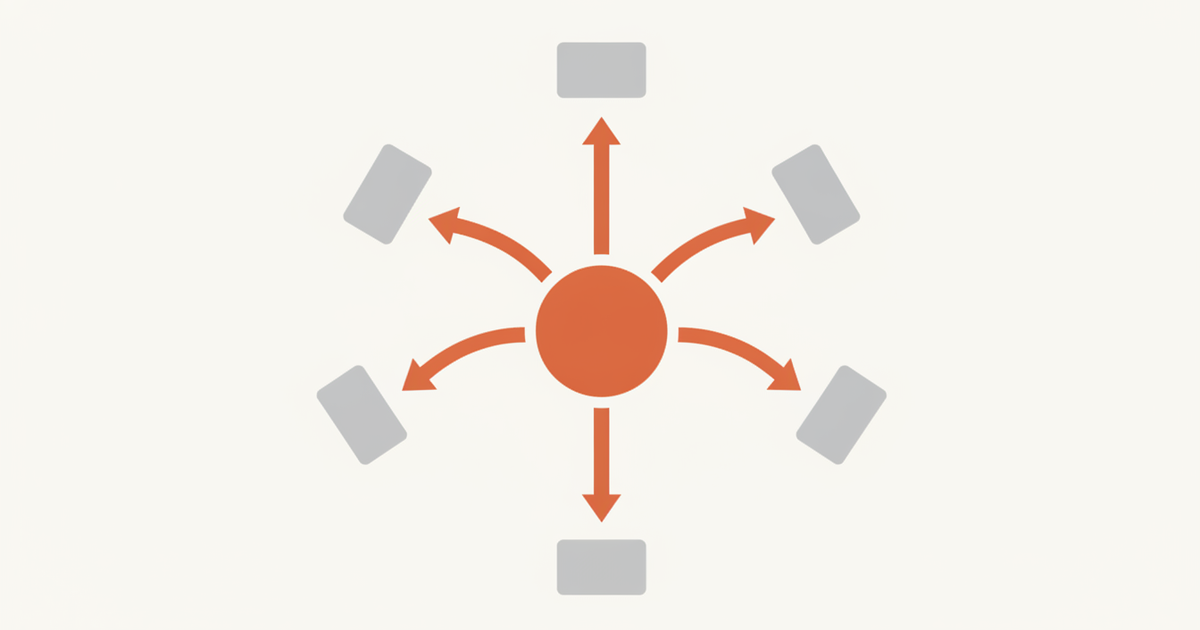
A super agent is one always-on agent that takes requests from wherever you work, keeps the shared context, and dispatches the work to isolated worker agents running in parallel. It comes back to you only when a decision or a result needs you.
That is the meaning this guide uses, and it comes from a specific design. On 2026-10-31 the DeepSeek Harness team published Exploring Super-agent Design: Towards a More Autonomous Agent System, which splits an agent system into a Router layer that talks to people and a Worker layer that does the work (IT之家 summary (Chinese)). Other companies use "super agent" or "superagent" for related but different ideas, so the first job is to separate them.
This guide covers why the idea exists, how different vendors use the term, the four properties a super agent needs, how the Router–Worker architecture fits together, what DeepSeek's first experiment showed, the problems still open, and a worked example you can try.
This guide is written by the Super Agent team. Super Agent is built on the Super-Agent design DeepSeek published, so we have a stake in the topic.
Key Takeaways
A super agent is a long-running Router that holds the shared context and hands work to isolated Workers, which run in parallel and report back to the Router instead of to you.
It exists because human attention, not model ability, is now the bottleneck: DeepSeek's team observed that one person can usually follow only 3 to 5 active agent sessions at once.
DeepSeek's design asks for four properties: continuous, efficient, proactive and persistent.
In DeepSeek's synthetic test of about 20 work requests, the super agent's p95 completion time was 15.7 minutes, against 29.5 minutes for a single session with a neutral prompt. The test measured scheduling, not single-task quality.
You likely need one if you run several coding agents at once, lose time switching between sessions, or want work to continue while you are away from the keyboard.
Why super agents exist: your attention is the limit
Super agents exist because the scarce resource has moved from the model to the person watching it. As models need less human help to finish a single task, what limits output is how many tasks one person can keep track of, according to the DeepSeek Harness team's article.
Most agent tools today treat one session as the unit of work. Each session is independent. If you push several pieces of work forward at once, you switch between sessions yourself and keep each one's context in your head. The DeepSeek team observed that one person can usually follow only 3 to 5 active sessions at the same time (IT之家). In our reading, past that point, adding more agents doesn't add output, because the person has become the router.
Adding tools to a single local agent does not remove that ceiling. The same article lists three problems that remain even when you extend a local agent with a CLI, MCP or external connectors:
- Synchronous blocking. One session works on one thing at a time. While it runs a long tool call, it cannot take your next instruction.
- Mixed-up context. Several tasks in one session pollute each other's context, and several sessions force you to carry the links between them.
- Work stops when the device does. Close the laptop or lose the network, and a locally running session stops too.
A super agent answers each of these. It gives the routing job to an agent, keeps every task in its own isolated session, and runs on infrastructure that stays up when your laptop does not.
If you already run several Claude Code sessions side by side, you have met these limits in practice.
How the term "super agent" is used by different vendors
"Super agent" does not have one industry definition. At least three meanings are in circulation, and they overlap only partly.
Salesforce: an orchestrator agent over sub-agents
Salesforce uses "Superagents" for a central agent that coordinates specialists. Its explainer says Superagents "are autonomous AI agents that orchestrate specialized sub-agents" and that "A Superagent, or sometimes referred to as a Primary Agent or Orchestrator Agent, is a central AI agent" that works directly with the user and delegates parts of a business workflow to sub-agents (Salesforce).
This is the closest of the vendor meanings to the Router–Worker idea: one point of contact, many specialists behind it. The framing is enterprise workflows rather than a developer's coding agents.
Genspark: an agent you hand a whole job to
Genspark uses "Super Agent" for a product that takes a complete task. You describe the finished result and attach files; it plans the steps, runs them on a cloud computer, and hands back files such as a report, a slide deck or a spreadsheet. Genspark's help center calls it "the agent you hand a job to", says a long job can run for up to two hours, and notes that it keeps working after you close the tab (Genspark).
That meaning is about autonomy on one job at a time. It does not center on routing many parallel tasks or on an agent that stays online between jobs.
DeepSeek: a Router over isolated Workers
The DeepSeek Harness team uses "Super-agent" for a new form of agent system with a two-layer architecture. A Router layer takes human interaction, keeps the global context and assigns tasks. A Worker layer runs the actual work in sessions isolated from each other. Workers do not reply to users directly; they report status and results to the Router, which handles all outward communication (IT之家).
This guide follows that meaning, because it is the one aimed at the attention problem above. For a closer reading of DeepSeek's article and prototype, see our DeepSeek Super-Agent breakdown.
Super agent vs single session vs subagents vs multi-agent framework
The table below compares the Router–Worker super agent with three setups people often confuse it with. It is a qualitative comparison of typical designs, not a benchmark.
| Single agent session | Session with subagents | Multi-agent framework | Router–Worker super agent | |
|---|---|---|---|---|
| Who you talk to | The session | The parent session | Whatever the developer wires up | One Router, from any channel |
| How long it lives | Until you close it | Until the parent session ends | Per run of the program | Always on |
| Parallel work | One task at a time | Helpers inside one task | Yes, as designed by the developer | Many tasks, each in its own Worker |
| Context isolation | None between tasks | Partial; the parent holds everything | Depends on the design | Each task in its own Worker session |
| Starts work on its own | No | No | If programmed to | Yes, from events, under rules |
| Who coordinates | You | The parent session | Code you write | The Router |
A multi-agent framework is a toolkit for building agent systems. A super agent is one specific kind of system you could build with such a toolkit: long-running, human-facing, and organized around a Router.
The four properties of a super agent
DeepSeek's design defines a super agent by four basic properties: continuous, efficient, proactive and persistent. Each one maps to a limit of the single-session model.
Continuous
A continuous agent is the same agent wherever you reach it. You can talk to it in instant messaging, in GitHub comments or in other channels, and it is one agent with one memory of the work. DeepSeek's article shows the same task moving between an IM group chat and a GitHub pull request review (IT之家).
For developers, this means a conversation you start in a chat app can continue in a code review without you re-explaining it.
Efficient
An efficient agent handles several complex tasks in parallel. In the single-session model, a second task waits for the first or crowds into the same context. In the Router–Worker model, each task gets its own Worker, so tasks proceed side by side (IT之家).
Proactive
A proactive agent watches for events and moves worthwhile work forward without being asked. DeepSeek describes a system that keeps observing its environment and advances items worth handling. One example in the article is an agent that follows a public group chat, spots a defect without anyone @-mentioning the agent, and submits a fix as a pull request (IT之家).
Proactive does not mean unsupervised. The prototype's own philosophy is that the agent "acts only when asked, or when a written rule allows it", and that work nobody asked for "starts in a mode that only records what the agent would have done" (dsh 000 Philosophy).
Persistent
A persistent agent is always online and recovers from failures during long runs. It does not stop when you close a terminal or your laptop sleeps, and it can return to a working state after errors (IT之家). Persistence is what turns an agent from a tool you open into a collaborator that is there when work arrives.
How the Router–Worker architecture works
DeepSeek's overall architecture has five parts: the two-layer Router/Worker structure, event-driven input, human-facing interaction, separation of compute, state and environment, and a Watchdog. The diagram below shows how they connect.
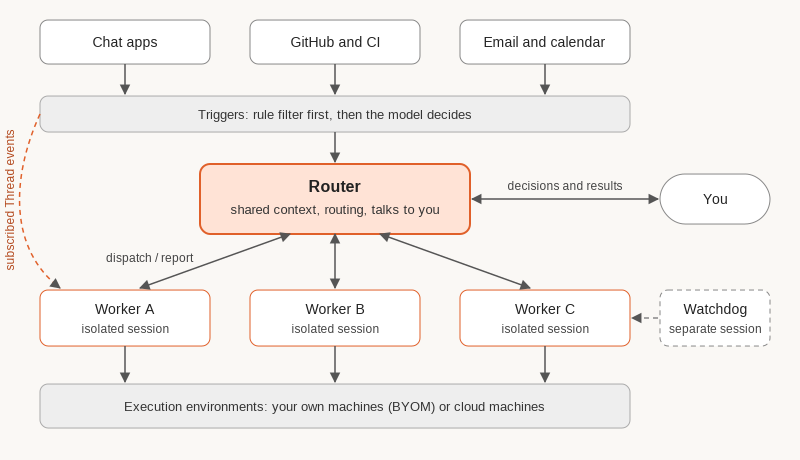
Source: Super Agent team diagram of the architecture described in DeepSeek Harness's "Exploring Super-agent Design" article, as summarized by IT之家 (Chinese, 2026-10-31).
The Router layer
The Router is the only part of the system that talks to people. It takes human messages, keeps the global context across all tasks, and decides where each piece of work goes. Because one Router holds the overview, you no longer have to remember which session is doing what.
The Router also batches. In DeepSeek's stress test, when Triggers arrived faster, the Router merged backlogged events into larger batches, so the inference time spent per decision went down even as each request took a little longer. The team took this as a sign that the Router can raise effective throughput during bursts (IT之家). The test numbers are in the experiment section below.
The Worker layer
Workers do the actual work, each in its own isolated session. Several Workers run at the same time, and none of them reply to you directly. They report status and results to the Router, which decides what you need to hear (IT之家).
Isolation is the point. A Worker fixing a test failure does not carry the context of another Worker drafting documentation, so neither gets confused by the other's history.
Triggers, Threads and subscriptions
A super agent is event-driven: outside signals arrive as Triggers. DeepSeek's examples include group chat messages, email and calendar reminders, code review comments and CI results. Program rules filter the events first, and only what passes goes to the model to decide whether action is needed.
A Thread is a sequence of related Triggers, such as one IM topic or one GitHub pull request. Once a task is assigned, its Worker can subscribe to the Thread, and later events on it go straight to that Worker without passing through the Router each time. That keeps routing load down (IT之家). In the prototype (which calls the unit of work a Ticket and its worker an Executor), subscription delivery "bypasses the gate and grants no new authority", so a message on a subscribed Thread adds context but cannot widen what the Worker is allowed to do (dsh 002 Authorization).
Observe before you act
Proactive work starts in record-only mode. In DeepSeek's prototype, the accept mode for inferred work (anything nobody explicitly asked for) has three settings: off, observe and auto. The default is observe, where a positive assessment is recorded as "would accept" and nothing is accepted. The docs advise starting in observe and switching to auto only after reviewing the recorded decisions; explicit requests work in every mode (dsh 002 Authorization).
This is a sensible pattern for any proactive agent. You see what it would have done, check its judgment against yours, and only then let it act.
Keeping context without flooding it
Two mechanisms keep the agent's context useful as history grows. Inline & Spill puts information likely to be needed soon directly into the model's context window and keeps over-budget or rarely used material outside it, for the model to read on demand. Chain of Recall lets the model follow reference IDs between Triggers, Threads and Worker sessions to recover the history of earlier tasks step by step (IT之家).
Speculative and asynchronous work
Speculative execution starts useful work before you ask. When a meeting invitation arrives, the agent can check for calendar conflicts, gather background and draft a reply. In a development chat, it can try to reproduce a reported fault and look for a fix while people are still discussing it, delivering a result only once it has confirmed the problem and found a simple fix.
The article also proposes an asynchronous ReAct loop. Long tool calls become asynchronous start() and stop() calls: the agent starts background work, returns a Started status right away, and receives the result later as a new event, so the conversation can keep taking your messages. The team notes that this is implemented in DeepSeek Harness but not on by default (IT之家).
Compute, state and environment, kept apart (BYOM)
Separating where the agent thinks from where it acts is what makes "always on" practical. DeepSeek's design puts the agent loop's compute and persistent state in the cloud, while the execution environment can stay on the user's own device, which runs only a lightweight daemon that executes commands and returns results. This supports BYOM (Bring Your Own Machine): you connect the development machine or personal computer you already use, or a cloud-hosted or on-demand machine (IT之家).
The Watchdog
A Watchdog is a separate session that watches the rest of the system. It sits outside the main architecture as an external control loop. It monitors infrastructure problems such as interface errors and failed state recovery, and it also uses the model to judge whether each Worker is making real progress or drifting from its goal, stepping in to repair things when it finds a problem (IT之家).
What DeepSeek's experiment showed (and what it didn't)
In DeepSeek's first experiment, the super agent's p95 completion time was about half that of a single session with a neutral prompt. The team compared four setups: the super agent, the super agent with event pass-through removed, and a single session with subagents under two prompt configurations.
Each run contained about 300 messages, of which about 20 were work requests, and each setup ran 5 times. Task completion time was measured from a work request to its result message. The results, as reported by IT之家:
| Setup | p50 completion time | p95 completion time |
|---|---|---|
| Super-agent | 12.4 min | 15.7 min |
| Single session, neutral prompt | not reported in the summary | 29.5 min |
The Router stress test looked at what happens under load. As the Trigger arrival rate rose from about 1 per minute to about 40 per minute, the average batch size grew from 1.0 to 2.8 and each Router request took longer (2.5 s to 3.9 s), but the inference time amortized per decision fell from 6.4 s to 1.6 s. (IT之家)
Read the caveats before quoting the numbers
The DeepSeek team states that these experiments used synthetic load in a simplified environment. They evaluate scheduling and collaboration, and they do not measure how well any single task is executed. Message intervals and work durations were scaled to one quarter, while model call latency was real (IT之家).
So the fair reading is narrow: under a bursty stream of mixed messages, a Router with isolated Workers got 95% of its results back in about half the time (p95) of one session juggling everything. Tail latency is the useful number here, because when you are waiting on several tasks, the slowest one decides when you can stop checking. The test says nothing yet about whether code quality, accuracy or cost improve.
The team also reports that an internal super agent built this way on DeepSeek Harness is running continuously, helping with reproducing and fixing issues, responding to code review, and developing DeepSeek Harness itself (IT之家). The public prototype, dsh-superagent, is a proactive coding agent for one GitHub repository that listens to GitHub and, optionally, Feishu. Its README calls it a "Research prototype for reference only, not an official DeepSeek product" and says some designs in the article are not implemented in it (dsh README).
Open problems the design still has
The Router–Worker design is a direction, not a finished answer. DeepSeek's article lists the questions it leaves open (IT之家):
- Scaling the Router. How the Router layer grows as the number and size of tasks grows.
- Long-horizon memory. Memory that spans months or longer, beyond what context management covers today.
- Collaboration outside the session. How people and agents work together once the session is no longer the unit of interaction.
- Agent-to-agent communication. How separate agent instances talk to each other (A2A).
- Security and privacy. Once a cloud agent connects to local devices, prompt injection, credential leakage on the device, and permission risks across devices all need more work.
The security point matters most for anyone connecting a super agent to their own machines. The prototype's answer to part of it is layered permissions: the host enforces allowed lists, rules and mandates, and messages, comments and quoted documents "cannot change those permissions" (dsh 002 Authorization). Approval prompts for edits and commands, covered in the next section, are another practical layer.
A super agent in practice: Super Agent as a worked example
Super Agent is one way to run this design on your own computers today: bots on your machines (Free) and, on Pro, a Router that hands them your requests and comes back when a decision needs you. It is built on the Super-Agent design DeepSeek published; it is not a DeepSeek product. Here is how its parts map to the architecture above. The descriptions come from the product's own documentation at Super Agent.
Workers: bots on your own computers
On Super Agent, a Worker is a bot. You set one up once: you pick a computer, an AI worker (Claude Code, Codex or Grok) and a project folder. Each bot has its own instructions, skills and tools, its own computer and project folder, and its own approval level, so the bots you trust ask less. It uses the copies of those agents already installed and signed in on your computer, with your own subscription or API key.
Bring your own machine: the crewbot connector
The BYOM part is crewbot, an open source (MIT) connector you run with npx crewbot start (Node.js 22 or newer). It makes one outgoing connection and never listens on a port, so it works behind home routers and company firewalls. Your files stay on your computer and the work happens there; only the conversation syncs online. You can connect several computers and give each bot its own.
The Router: the Super Agent assistant (Pro)
The Router role is the Super Agent assistant, available on Pro ($14.90/month). It stays online, hands each request to the right bot and reports back, and keeps several tasks moving while you are away.
Tasks: one board, follow-ups in place
Each request becomes a task on one board that shows what is running, what is done and what is waiting on you. Follow-ups on the same topic land in the same task, which plays the part of a Thread. You can also send a new instruction mid-task instead of waiting for the current job to finish.
Approvals: you decide, from any device
Edits and commands that need permission show up in your browser for you to allow or reject, and the first answer from any of your devices counts. Every device shows the same conversation, so you can start a task on your laptop and approve the next step from your phone. This part is on the Free plan.
Channels and schedules (Pro)
For the continuous and proactive properties, Pro adds WeChat and Telegram as channels next to the web workspace, with answers coming back in the chat where you asked. Pro also adds schedules, which have a bot start work at times you set, each run in its own session. In group chats you write rules for what it should pick up, and it starts in watch-only mode so you can see what it would take before you let it act: the same observe-before-act idea as DeepSeek's prototype.
What the Free plan covers
Free lets you connect your computers with one command, create bots for Claude Code, Codex and Grok, chat with them from any browser or phone, and approve edits and commands remotely. That gives you isolated Workers and remote control without the Router.
Go deeper:
- How the Super Agent team set out to build a super agent that runs around the clock
- Claude Code Remote Control: how Anthropic's feature works and the alternatives
Do you need a super agent? A checklist
You probably need a super agent if your bottleneck is keeping track of agents, not getting a single agent to do good work. Go through these questions:
- Do you regularly run more than two or three coding agent sessions at once? If you are near the 3 to 5 session ceiling DeepSeek's team observed, routing is now your job, and it can be handed off.
- Do you lose time switching tabs to find which session needs you? A Router that comes back only for decisions removes that polling.
- Do tasks need to keep going when you close the laptop or leave your desk? That calls for the persistent property and a separation between where the agent runs and where you talk to it.
- Do you want to reach your agents from chat apps or your phone? That is the continuous property.
- Do events (CI failures, review comments, chat messages) regularly create work? Then a proactive, event-driven setup, started in observe mode, can pick it up.
- Do your tasks pollute each other's context when run in one session? Isolated Workers fix that.
If you answered yes to one or two, a simpler tool may be enough. If you only want to continue one local Claude Code session from another device, Anthropic's Remote Control does that: it connects claude.ai/code or the Claude app to a Claude Code session running on your machine (Claude Code docs). If most of your answers are yes, a Router–Worker setup is worth trying.
If you are comparing tools in this space, our guide to the best OpenClaw alternative for developers covers personal agents.
Frequently Asked Questions
Is a super agent the same as a multi-agent system?
A super agent is a kind of multi-agent system, but not every multi-agent system is a super agent. In the Router–Worker sense, a super agent is always on, has one Router that faces people, and runs each task in an isolated Worker that reports back to the Router (IT之家). Many multi-agent systems are programs that run once for one job.
Is Super Agent made by DeepSeek?
No. Super Agent is built on the Super-Agent design the DeepSeek Harness team published, and it is not made, endorsed by or affiliated with DeepSeek. DeepSeek's own implementation is the dsh-superagent research prototype, which its README describes as "not an official DeepSeek product" (dsh README).
Do I need DeepSeek Harness to run a super agent?
Not for the idea itself. The Router–Worker design is an architecture, and you can apply it with other tools. DeepSeek's prototype is packaged as a bundle for DeepSeek Harness, so running that specific prototype does need it (dsh README). Super Agent does not: it needs Node.js 22 or newer and Claude Code, Codex or Grok on your computer.
Is "superagent" the same as "super agent"?
They are spellings of the same phrase, but vendors attach different meanings to it. Salesforce writes "Superagents" for an orchestrator agent over sub-agents (Salesforce), Genspark writes "Super Agent" for an agent that completes one job on a cloud computer (Genspark), and DeepSeek writes "Super-agent" for the Router–Worker design. Check which meaning a page uses before comparing products.
Does a super agent run my code in the cloud or on my computer?
It depends on the implementation, and DeepSeek's design allows both. Compute and persistent state sit in the cloud, while execution can stay on your own device through a lightweight daemon, or run on a cloud-hosted machine (IT之家). With Super Agent, files stay on your computer and the work happens there.
The bottom line
A super agent moves the routing job from you to an agent. One always-on Router keeps the context and talks to you; isolated Workers do the work in parallel and report back; events and schedules can start work, and work nobody asked for starts in observe mode; and the system keeps running when your laptop does not.
The design is new. DeepSeek's early numbers show faster tail turnaround under synthetic load, not better individual results, and real problems around Router scaling, long-term memory and device security are still open. If you already run several coding agents and spend your day checking on them, it is the right problem to be solving.
Want to try the pattern on your own machines? Super Agent is free to start: connect a computer with npx crewbot start, create a bot, and hand off your first task.