
Building a 24/7 Super Agent in 10 Days
I read DeepSeek's Super-agent design and built it into a 24/7 product in 10 days: Router–Worker, a Task layer, async ReAct and the three build steps.
Originally published in Chinese on WeChat and shared on r/DeepSeek. Lightly edited for the web; an update for November 2026 is at the end.
On October 31, the DeepSeek Harness team published "Exploring Super-agent Design: Towards a More Autonomous Agent System" (linked here via an IT之家 press summary; the original is on DeepSeek Harness's WeChat account), along with a research prototype on GitHub. After reading it, I made a decision: I was going to build it. Ten days later, tonight, after I had the newly released Fable 5.2 run the last test case, it officially went live.
This is a real Super-agent that stays online 24/7. Storage and compute are separated, the cloud loop is decoupled from the heavy, stateful environment, and it scales horizontally. It basically implements the architecture and features described in the article. It is also a SaaS product.
Key Takeaways
I built DeepSeek's Super-agent design into a 24/7 SaaS product in 10 days, because I was already working as a "human Router" across five or six projects with 3 to 5 sessions each.
The Router is the SA itself: the single point of contact for people and channels, managing the agent Workers and putting their context on one shared plane.
I added a "Task" layer on top of sessions, so people only manage tasks while session details stay available for tracing back what ran.
The build took three steps: connect devices and local coding agents as Workers (via the open-source crewbot daemon), make every bot independent and customizable, then add the Router.
Connecting devices and bots is free. The roadmap at the time: more channels for the Router, mobile and desktop apps, and more complex task scheduling.
Why Did I Decide to Build the Super-agent Architecture at First Sight?
Because I am the "human Router" the article describes. Better harnesses and models mean we no longer have to be stuck in tedious hands-on work. Instead, we have shifted toward assigning tasks, making decisions and signing off on goals.
Looking back at my daily work: I usually have five or six projects going at once, with an average of 3 to 5 sessions per project. I've also moved from a traditional terminal to a new kind of terminal that supports unlimited expansion and layouts, and I usually open two more sessions in Cursor to glance at the code now and then. It looks roughly like this, with project details hidden:
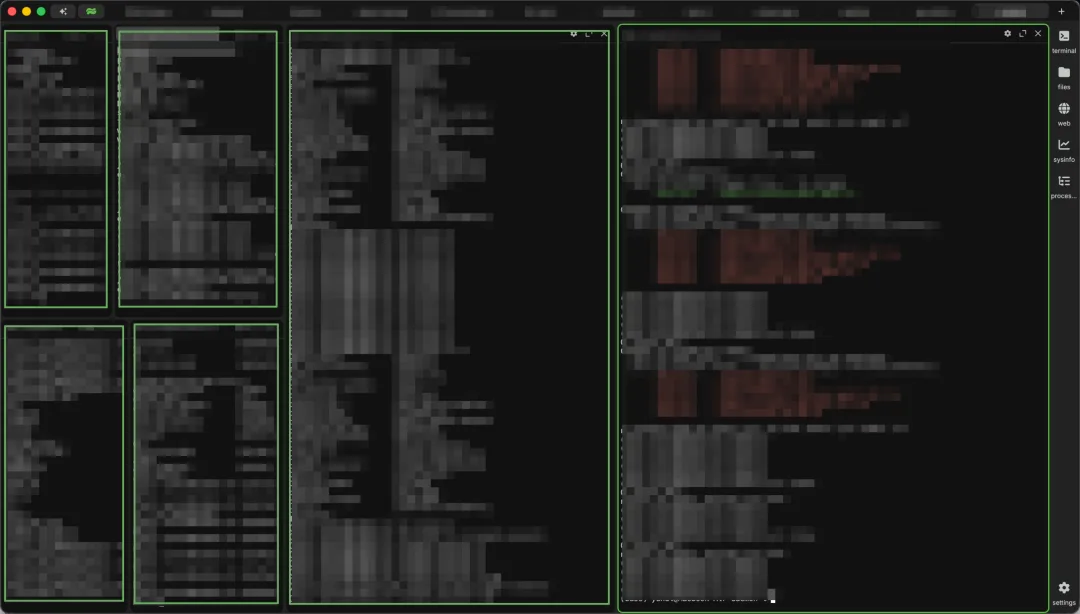
The new terminal is very efficient. I occasionally check session details and the decisions the model needs me to make. Mostly, though, I start a server in one window, hand out tasks in another, run tests in a third, ask about project details in a fourth, research online in a fifth... Then the model runs out of quota, so I switch to a desktop agent and use Browser Use for a while, and on top of that there's information coming in from every channel.
I drive many sessions in parallel. I have task goals and a consistent context. I sit at my desk for a long time, and I'd like to move to the sofa, lie down and give commands by voice.
After one read through the Super-agent architecture, I was fairly sure it could be built. Not because "the engineering is simple," but because while the rest of us only had pain and complaints, it had already put the answer in front of us. To me, that truly counts as exploring uncharted territory.
I believe the author went through all of the same pain, and then ran a very small product experiment: a single pipeline from "a product issue raised in a public group chat, to development, to a submitted pull request." From that small case, plus accumulated knowledge of computing and the industry, came this architecture design. The design is basically tailor-made. Combining local coding agents and moving them online is something I had wanted to do all along.
Learning the Super-agent Architecture First
The article argues that a Super-Agent (SA for short; see what a super agent is ) has the following four properties:
- Continuous: "Continuous" in the article is about the agent: it should be present everywhere it needs to work. People get work information through different channels and tools, so the agent's context needs to be brought up to one level, instead of being maintained by hand. Connecting every information channel and sharing context is the key.
- Efficient: Information and tasks arrive concurrently, so work should also run in parallel. An independent task shouldn't have to wait. This needs independent working environments that don't interfere with each other.
- Proactive: It keeps observing the environment and moves things forward on its own, without the user being involved. This comes from being event-driven: events trigger the SA's response. There is actually another kind of trigger, schedules, which run tasks according to a time plan. With shorter intervals, this can also feel very proactive, smart and eager, rather than a simple timed job.
- Persistent: In other words, self-healing mechanisms. An SA that stays online can only keep working efficiently if someone is always there to clean up failures.
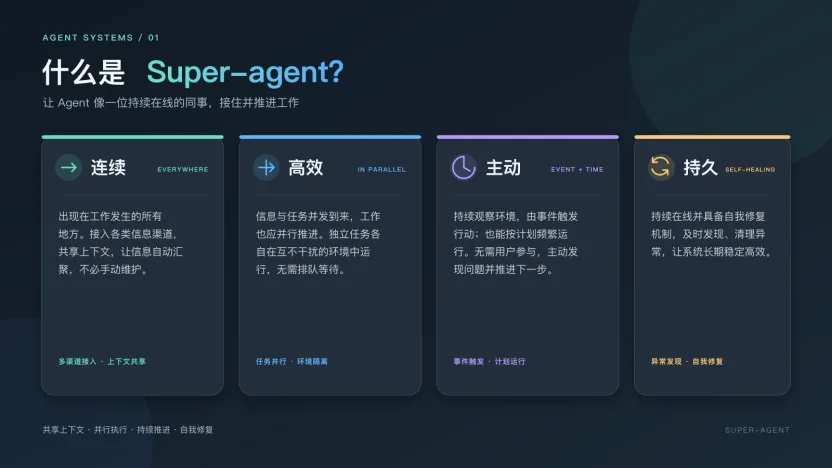
Around these four properties, the article designs five systems. Here I'll focus on the "two-layer architecture of the Router layer" and extend its design; I won't go over the others (there's a fuller breakdown of DeepSeek's Super-agent design on this blog).
The Router Layer Is the Center of the System
In fact, the Router is the SA. Externally, it handles interaction: it is the single point of contact with people, and it connects to every channel, such as IM, GitHub, Slack, WeChat, Gmail and so on. Internally, it manages all the agent Workers below it and puts their context on one shared plane.
Looking back at how I used to work, it really replaces me as the "human Router." It acts as my assistant and reports work to me, which makes it possible for us to manage projects as individuals.
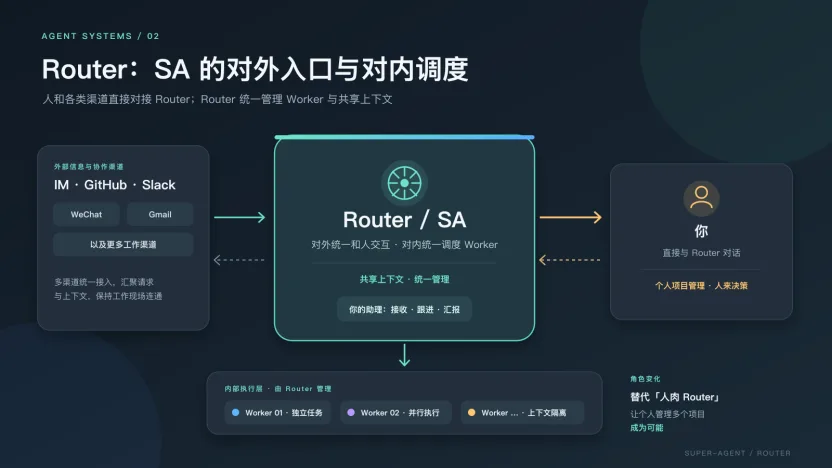
From the Router's point of view, it's a bit like OpenClaw (the "little lobster") from earlier this year, but the gap is still very large. When I have time later, I may compare a few similar products.
A Task-Oriented Design
The article describes in detail the cross-task information and decisions the Router layer has to handle, with a focus on the process and design of event-driven message routing.
But what people still have to deal with is the session. You can think of a session as a self-contained, complete workflow with a unified context, made smarter by the LLM. To manage complex projects, though, you also need workflow scheduling, managing and assigning people on the project, allocating resources, and so on.
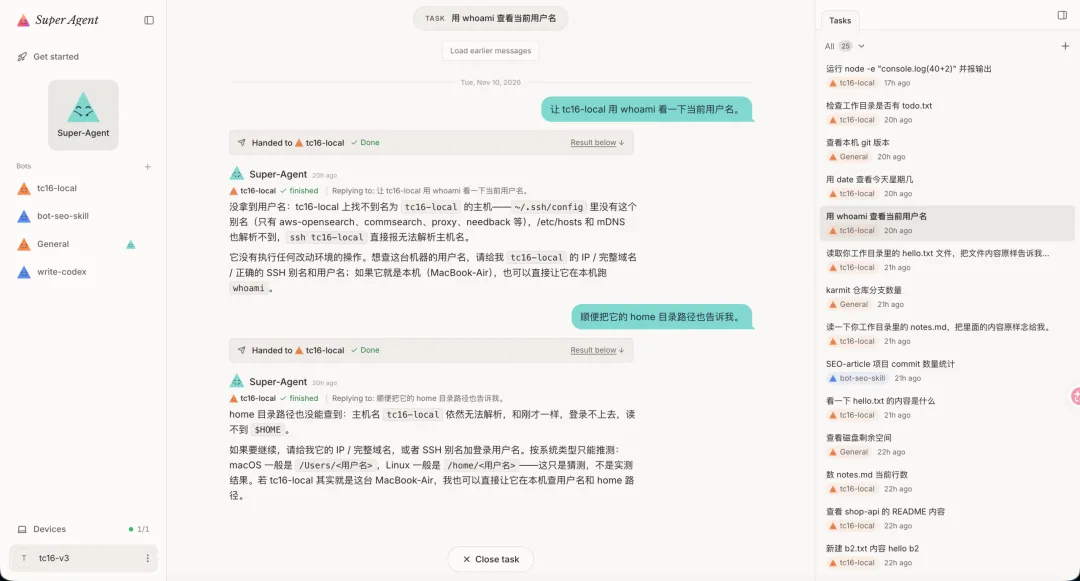
So while turning it into a product, I introduced the concept of a "Task." In a project, people really only need to take part in managing tasks, while session-level details are kept so you can trace back what was executed. It also makes it possible to split the SA horizontally, since the article also points out that the SA doesn't become a bottleneck during event routing, so there's no need to scale it horizontally. In the screenshot below, the right sidebar is the Task list; click a task to open the Task view:
The Async ReAct Architecture
Taken as a whole, the Router and Worker architecture is an asynchronous ReAct scheme. The Router dispatches a message to a Worker without waiting and can immediately handle the next one. Several messages arriving at the same time can also be handled at the same time, which increases throughput. When a Worker finishes a task, it reports the result, and the Router returns it to the user. The ReAct part shows up in more complex asynchronous scheduling: because of Tasks, different sessions can run in parallel, branch with if-else, wait-continue, and so on.
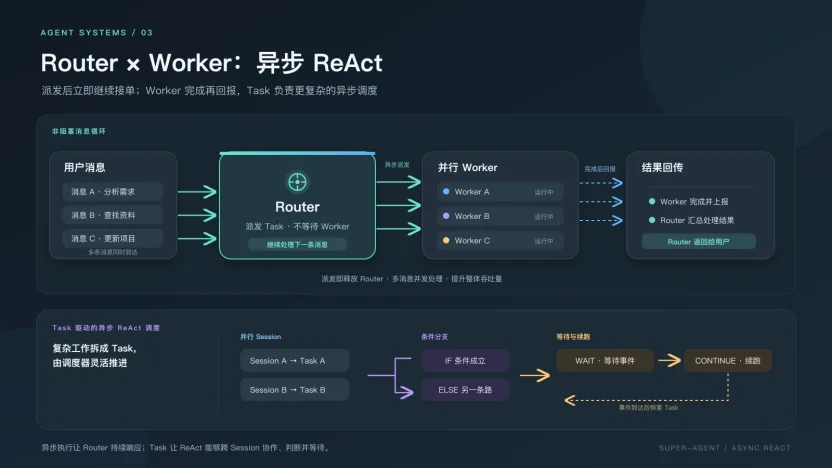
Since these run as asynchronous tasks, I think people are quite tolerant of execution time. It does its thing, I go do something else, and when it's done I get the report.
Honestly, I don't quite understand why DeepSeek Harness introduced async ReAct; the architecture alone is enough.
How I Built It: Three Steps in 10 Days
The 10-day build happened in three main steps. Early on I mainly used Opus 5.5 and Fable 5.1, but later, while designing the Router, they got seriously dumber and often couldn't get to the point on a single question. Those few days I was basically arguing with them until late at night... Luckily, two days later Fable 5.2 was released, and things started moving.
Step 1: Connecting Devices and Agents as Worker Resources
My first step wasn't implementing anything Router-related. Instead, I moved all my local coding agents online and managed them in one place. I'd had this idea for a long time. It's a very self-contained piece, and on its own it greatly improves the product experience and efficiency:
- You can connect anytime, anywhere, instead of staying next to your computer.
- Each agent's resources are isolated, and its role, tasks, tools, skills and so on can be customized and visualized. You can make lots of independent, lightweight bots. This matters a lot too. By contrast, many desktop products throw everything into one big mix: the product design is piling on features, and the user experience is confusion.
- You can combine different vendors' coding agents and use the strongest harnesses and LLMs.
So step one was to physically connect all my computers and other devices, and logically connect all the local agents, so they could be called as the underlying Workers. That's why I released crewbot first: an open-source daemon you install on each device (later it may be built into the desktop app, which should feel better for users). Details and the repository are here:
https://github.com/nifengxiaofei/crewbot-connector
Once it's installed, it looks like this:
(base) test1@MacBook-Air daemon % crewbot status
crewbot 0.2.7 (protocol v2)
Daemon
status    running (pid 65637, up 1d 23h)
server    https://super-agent.team — reconnecting for 7m
agents    0 process(es) running
account   linked
Device
hostname  MacBook-Air.local
os        darwin (arm64)
Agents
Claude Code 2.1.321  ✓ ready
Codex 0.166.0  ✓ ready
Grok 1.0.77  ✓ ready
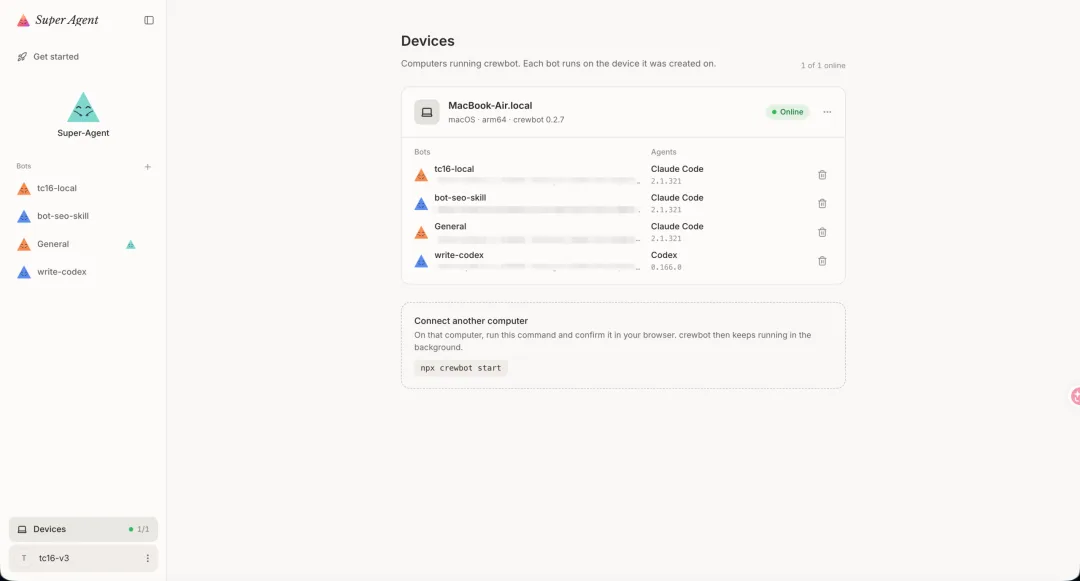
Step 2: Every Bot Is Independent and Takes Tasks Online
To stay as compatible as possible with the old way of working, once connected each bot is an independent executor. Talking to them and assigning tasks is no different from using the CLI locally. All the "data," "subscriptions" and "APIs" used are the ones on your local device.
These CLI agents, such as Claude Code, Codex and DeepSeek Harness, are the product of a huge amount of engineering practice, and pairing them with specialized models is the best practice.
My favorite feature is customizing each bot: giving it different skills so it can carry out tasks for me, using openly available professional skills to greatly extend what I can do on my own. I also integrated a skills marketplace, with search and install done in one click, so I can easily equip an army of bots to work for me and evaluate the results.
Most agent products on the market today basically take the form of agent + skill, and the bots already organize that for you.
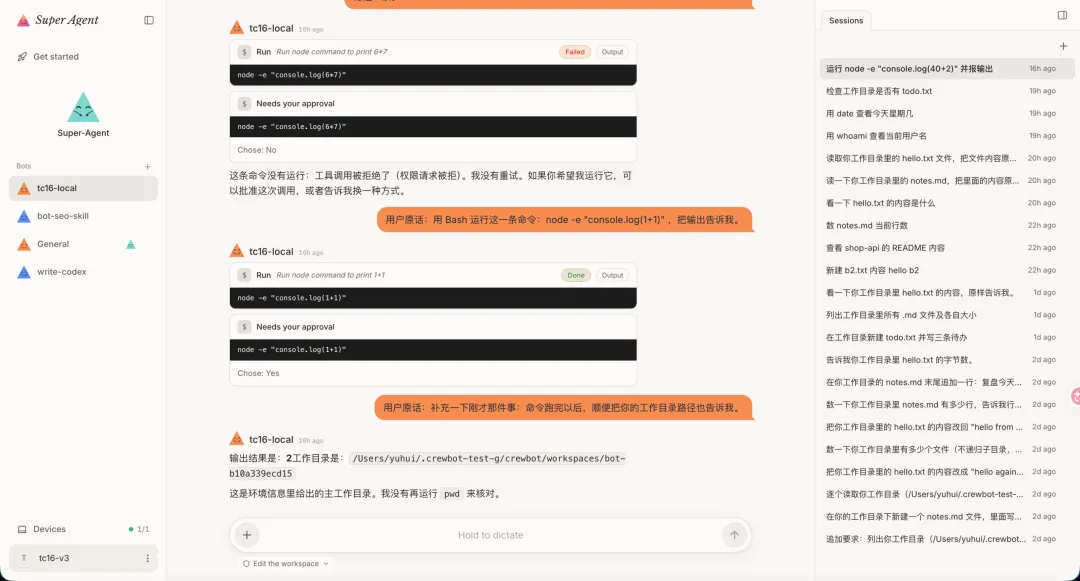
And so far, all of these features are free for everyone. You only need to register an account online.
Step 3: Adding the Router
The features above bring your local agent team to the cloud, while the Workers' working environment stays local. But you are still the head butler; the interaction experience and isolation are just better. To truly get "project management," you also need to add the smart assistant, the Router.
Any project or task management needs to:
- Create tasks and goals, view and assign tasks, check task goals, and sign off on tasks.
- Equip tasks and goals with resources, which here means the bots that do the work, each with different tools, skills and resources.
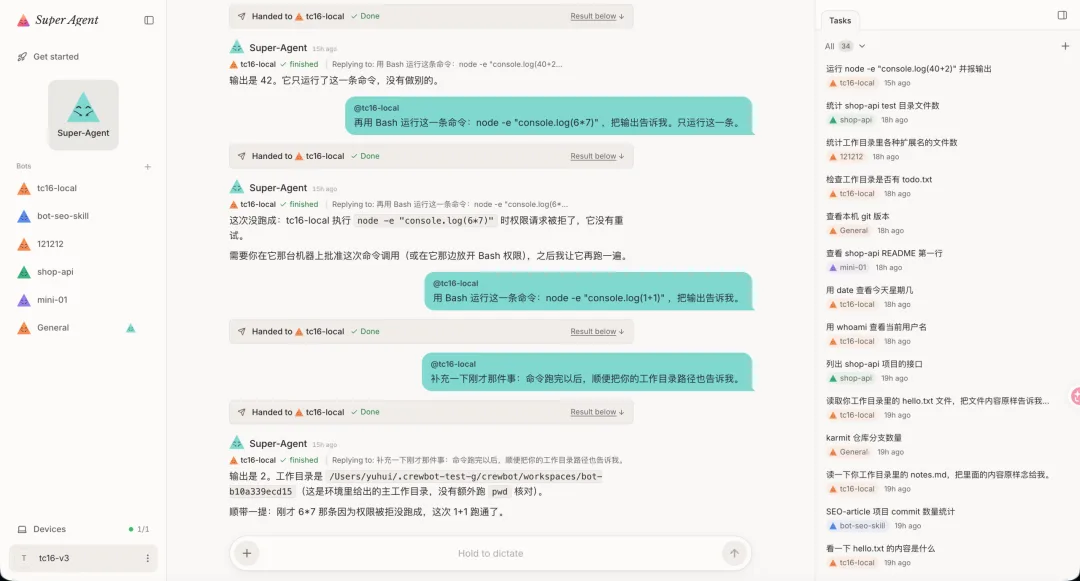
Now you can connect and send messages from the web or mobile web. The Router dispatches tasks to bots based on your messages, and the bots report back to you when they're done. Event-driven behavior and speculative execution are both easy to achieve.
What's Next on the Roadmap
Making it a more complete, more powerful product will take some further plans:
- Give the Router more information channels.
- Release mobile apps and a desktop version together, with the daemon built into the desktop version.
- Have the Router handle more complex task scheduling, and so on.
While designing and using the product, I also strongly felt what the article says: even with a personal assistant, everyone's way of working, project tasks, tools and understanding of AI are different. So the Super-Agent is also highly customized; you adjust and customize it as you use it.
Closing
Thank you so much for reading this far. If you're interested in this product, visit the address below. Register an account and you can bring your devices and agents online, completely free.
If you'd like to try the Super-Agent Router or have any questions, leave a comment and let me know.
Update (November 2026)
One item from the roadmap above is now live: the Router is the Super Agent assistant on the Pro plan, and you can now reach it on WeChat and Telegram as well as the web workspace, with replies coming back in the same chat (Pro). Schedules, the time-based trigger mentioned under "Proactive" above, are live too: a bot starts work at the times you set (Pro).